



Support
List Widgett
The List widget allows you to display content in one of several pre-formatted layouts, making it easy to organize information or content for your site visitors.
To add the List widget:
- In the left panel, click Widgets.
- Click and drag the List widget into your site.
Content Editor
To access the content editor:
- Right-click the widget, and click Edit Content.
- Select to include an Image element and Link element to be associated with each item on your list.
- Click Build your list to start adding content.
- Click Add Item to add additional items to the list.
- Type a title in the Main list title field provided.
- Click an existing list item to open the List Settings. You have the following options:
- + Image. Click to add an image.
- Item label. Type the item label. To hide the label, click the eye () icon.
- Description. Type a description for the item. To hide the description, click the eye () icon.
- Add link. Click and select the type of link you want to add to the item.
- Text on link. Type the text to display on the link. To hide the text on the link, click the eye () icon.
- Re-order the list items by clicking and dragging on the 3 dots to the left of each item.
- To return to the first page and set if links and images are displayed, click click here to change elements.
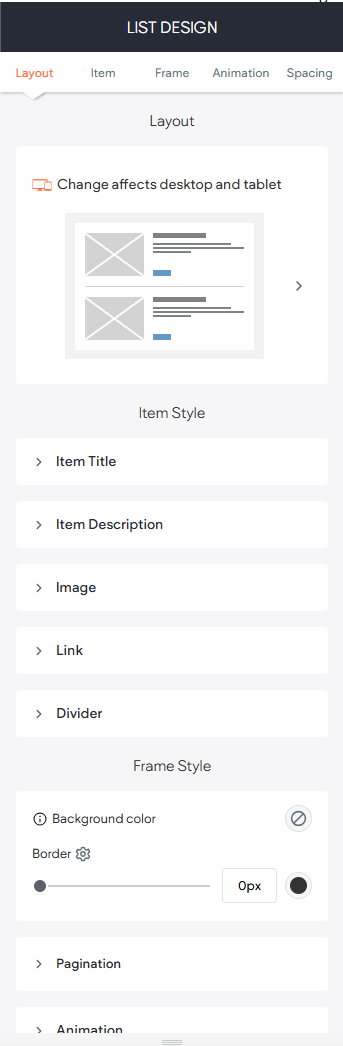
To access the design editor, right-click the widget, and click Edit Design.
- Click the Layout tab to select a layouts for the list.
- Click List Title, Item Title, Item Description, or Link to control the text styling for those fields.
- Click Image to modify the images border and give images rounded edges.
- Click Divider to select from several different divider styles.
EXAMPLE OF LIST ELEMENT:
List of Services
-
List Item 1 Write a description for this list item and include information that will interest site visitors. For example, you may want to describe a team member's experience, what makes a product special, or a unique service that you offer.List Item 1
-
List Item 2 Write a description for this list item and include information that will interest site visitors. For example, you may want to describe a team member's experience, what makes a product special, or a unique service that you offer.List Item 2
-
List Item 3 Write a description for this list item and include information that will interest site visitors. For example, you may want to describe a team member's experience, what makes a product special, or a unique service that you offer.List Item 3
-
List Item 4 Write a description for this list item and include information that will interest site visitors. For example, you may want to describe a team member's experience, what makes a product special, or a unique service that you offer.List Item 4

